
 Edu_Admin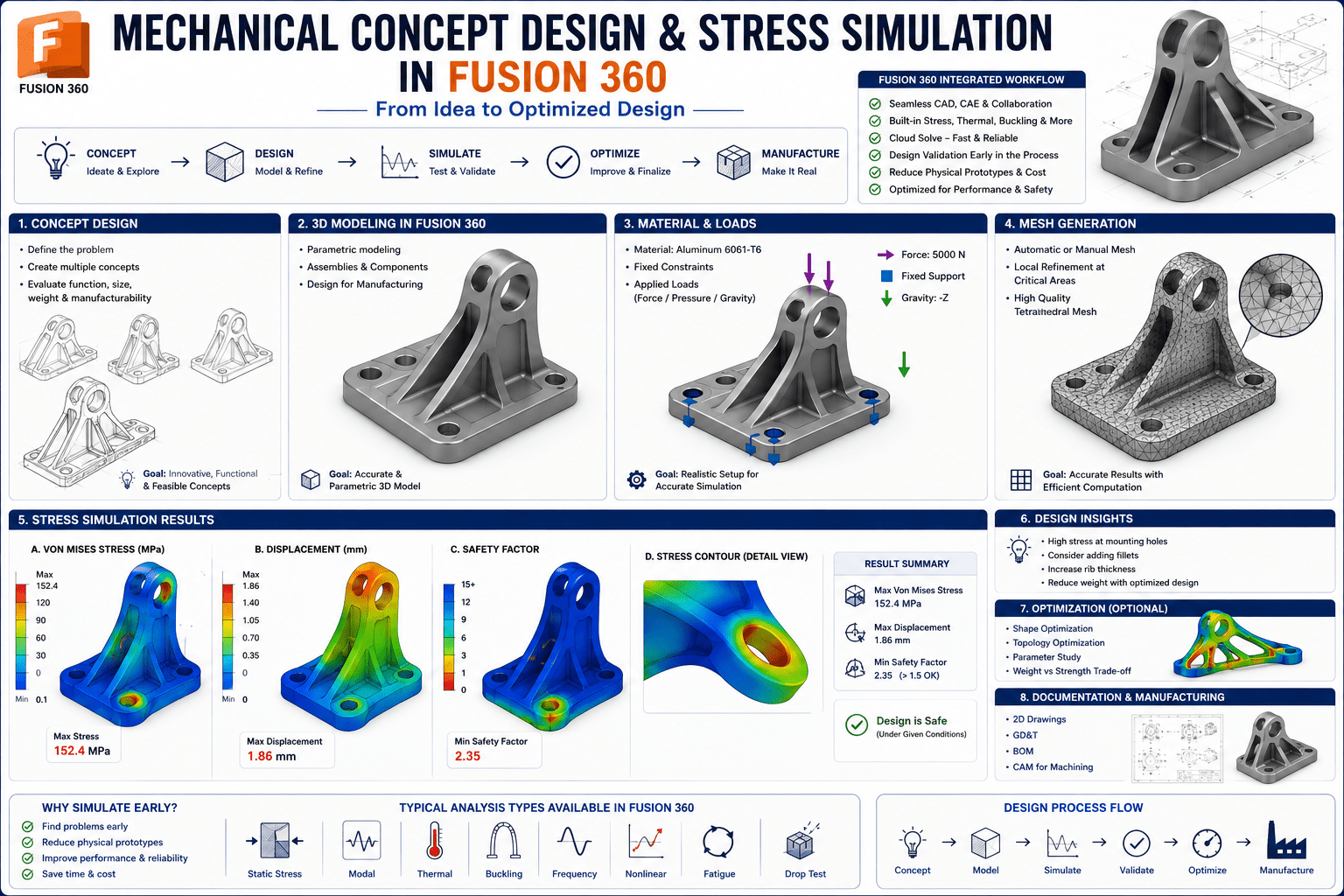
Introduction
Every mechanical engineer understands this moment. You have spent hours designing a component, refining every dimension, and ensuring it meets all functional requirements. The design looks perfect on the screen. But will it hold up under real-world loads? Will it fail when subjected to stress? Will it deform beyond acceptable limits?
The answer to these questions used to require building physical prototypes and subjecting them to destructive testing. This process was expensive, time-consuming, and often resulted in multiple design iterations before a viable product emerged.
Today, the landscape has changed dramatically. Simulation software enables engineers to test designs virtually, predicting how components will behave under load before any physical material is cut or formed. Among the tools available, Autodesk Fusion 360 stands out as an accessible, powerful platform that integrates design and simulation in a single environment.
mechanical concept design stress simulation Fusion 360 is a popular engineering design software, and the IN-Design CAE simulation module is very useful in validating designs. The software enables engineers and designers to predict how parts will behave under real-world loads before manufacturing.
The Mechanical concept design : Stress simulation in Fusion 360 course is designed specifically for design engineers, students, and makers who want to develop confidence in performing simulations with Fusion 360. With 43 lectures across 4 chapters and a total duration of 3 hours 48 minutes, this course provides a comprehensive introduction to static stress analysis using Fusion 360 simulation.
This guide provides a complete overview of mechanical concept design, stress simulation in Fusion 360, what the course covers, and how you can begin your journey toward becoming a confident simulation practitioner.
What Is Mechanical Concept Design?
Mechanical concept design is the process of creating and refining the fundamental ideas and structures that form the basis of a mechanical system. It involves translating functional requirements into physical forms, selecting materials, and determining the basic geometry and configuration of components.
Structures and Mechanisms
Any mechanical system consists of two fundamental elements: structures and mechanisms. Structures are static load-bearing elements that support loads without moving. Mechanisms are moving, functional elements that transmit motion and force.
Understanding the difference is essential because each requires different analytical approaches. Structures must be analysed for stress, deflection, and stability under static loads. Mechanisms must be analysed for kinematics, dynamics, and fatigue.
The Design Process
Mechanical concept design follows a systematic process:
- Requirements Definition: Understanding what the component or system must achieve
- Concept Generation: Developing multiple potential solutions
- Concept Evaluation: Assessing concepts against requirements
- Preliminary Analysis: Performing initial calculations and simulations
- Design Refinement: Iteratively improving the design based on analysis
- Detailed Design: Finalising dimensions, materials, and manufacturing requirements
Simulation plays a critical role at multiple stages of this process. It enables engineers to evaluate concepts virtually, compare alternatives, and refine designs before committing to manufacturing.
Why Stress Simulation Matters for Mechanical Design
Validation Before Manufacturing
The primary benefit of stress simulation is the ability to validate designs before any physical prototype is built. Fusion 360 simulation enables engineers to test designs under real-world conditions, identifying potential failures early in the design process. This early validation saves significant time and money.
Cost Reduction
Physical prototyping is expensive. Each iteration requires materials, machining time, and testing resources. Simulation reduces the number of physical prototypes needed by identifying problems virtually. As one source notes, simulation helps reduce the cost of prototyping.
Design Optimization
Simulation is not just about finding problems—it is about finding better designs. By analysing stress distribution, engineers can identify areas where material can be removed without compromising strength. This leads to lighter, more efficient designs.
Safety and Reliability
Ensuring structural integrity is essential for safety. Simulation enables engineers to calculate safety factors and verify that designs can withstand anticipated loads. This is particularly important in industries such as automotive, aerospace, and medical devices where failure can have catastrophic consequences.
Career Advancement
Proficiency in simulation is a highly valued skill in the engineering job market. Engineers who can validate designs through simulation are in demand and command premium salaries. Developing simulation skills early in your career provides a significant competitive advantage.
What Is Finite Element Analysis (FEA)?
Finite Element Analysis is the numerical method that underlies most engineering simulation. It is the mathematical technique used to predict how structures behave under loads.
The Basic Concept
FEA divides a complex structure into smaller, simpler elements. The behaviour of each element is described by mathematical equations. By combining the equations for all elements, the overall behaviour of the structure can be predicted.
Key Terminology
Understanding FEA requires familiarity with several key terms:
- Nodes: Points where elements connect
- Elements: The small pieces into which the structure is divided
- Mesh: The collection of elements that represents the structure
- Stiffness Matrix: A mathematical representation of how the structure resists deformation
- Force Matrix: A representation of the loads applied to the structure
- Displacement Matrix: A representation of how the structure deforms under load
Strong Form and Weak Form Solutions
FEA involves solving mathematical equations that describe the behaviour of structures. The strong form represents the exact differential equations, while the weak form is an approximation that is more suitable for numerical solution.
Linear vs Non-Linear Analysis
Linear analysis assumes that the relationship between load and deformation is proportional. Non-linear analysis accounts for more complex behaviour, such as large deformations, material plasticity, and contact.
The Simulation Workflow in Fusion 360
The simulation workflow in Fusion 360 follows a logical sequence that is accessible even to beginners.
Step 1: Switch to the Simulation Workspace
To begin a static stress simulation, switch from the Design workspace to the Simulation workspace using the dropdown menu. Select “Static Stress” as your study type to create a new study.
Step 2: Define Materials
Assign material properties to your model. Fusion 360 includes a comprehensive material library with common engineering materials. Material properties such as Young’s modulus, Poisson’s ratio, and yield strength are essential for accurate simulation.
Step 3: Apply Constraints
Constraints represent how the component is supported or fixed in place. Common constraint types include:
- Fixed Constraint: Fully restricts all degrees of freedom
- Pinned Constraint: Restricts translation but allows rotation
- Frictionless Constraint: Allows sliding along a surface
Step 4: Apply Loads
Loads represent the forces, pressures, or moments applied to the component. Fusion 360 supports various load types including:
- Force
- Pressure
- Moment
- Gravity
- Centrifugal force
Step 5: Generate the Mesh
The mesh divides the model into smaller elements for analysis. Mesh size affects accuracy and computation time. Smaller meshes provide more accurate results but require more computational resources. Stress singularities can occur at sharp corners or point loads, and understanding how to address them is an important skill.
Step 6: Run the Simulation
Once the setup is complete, run the simulation. Fusion 360 solves the equations and generates results.
Step 7: Interpret Results
The simulation produces several types of results:
- Von Mises Stress: A measure of the overall stress state, used to predict yielding
- Principal Stress: The maximum and minimum stresses at a point
- Displacement: How much the component deforms
- Factor of Safety: The ratio of allowable stress to actual stress
Fusion provides stress and displacement visualisation to understand how your design behaves under applied loads.
Key Concepts in Stress Simulation
Von Mises Stress
Von Mises stress is a scalar value that represents the overall stress state at a point. It is calculated from the principal stresses and is used to predict yielding in ductile materials. When the Von Mises stress exceeds the material’s yield strength, the component is expected to yield.
Factor of Safety
The factor of safety is the ratio of the material’s allowable stress to the actual stress in the component. A factor of safety greater than 1 indicates that the component is safe. The required factor of safety depends on the application and industry standards.
Principal Stress
Principal stresses are the maximum and minimum normal stresses at a point. They are important for understanding the stress state and for predicting failure in brittle materials.
Stress Singularities
Stress singularities occur at sharp corners, point loads, or other discontinuities where the theoretical stress becomes infinite. In practice, these are artifacts of the mathematical model rather than real physical phenomena. Understanding how to identify and address stress singularities is an important skill for simulation practitioners.
Mesh Size and Convergence
Mesh size affects the accuracy of simulation results. A finer mesh generally produces more accurate results but requires more computation time. Mesh convergence studies involve refining the mesh until the results stabilise.
What the Course Covers
The Mechanical concept design : Stress simulation in Fusion 360 course provides a comprehensive introduction to static stress analysis using Fusion 360 simulation.
Course Overview
What You Will Learn
Fundamentals of Finite Element Analysis
- Terminologies and the basic mathematics behind FEA
- The design process, levels of engineering analysis, and the need for FEA
- Strong form and weak form solutions
Simulation Setup in Fusion 360
- Setting up the simulation environment in Fusion 360
- Applying material properties
- Defining constraints including fixed, pinned, and frictionless
- Applying loads such as forces, pressures, and moments
- Generating and refining meshes
Interpreting Simulation Results
- Understanding Von Mises stress and principal stress
- Calculating and interpreting factor of safety
- Identifying and addressing stress singularities
- Mesh size considerations and convergence
Case Studies and Practical Applications
- Cantilever bracket optimization
- Simple beam design alternatives
- Simple frame rigidity analysis
- Torsional rigidity of H-frame
- L-sheet metal bracket design
- Clamp bracket with flanges
Developing Conceptualization Skills
- Developing structural conceptualization skills to solve design problems as in industry
- Weight optimization, stress reduction, and stiffening techniques
- Hand calculations vs FEA and correlation to testing
- Understanding the difference between FEA analyst and design engineer roles
Enrol in Mechanical concept design : Stress simulation in Fusion 360 Now
Who Should Take This Course
Entry-Level Design Engineers
Design engineers who are at the entry level in industry will find this course invaluable for building simulation skills. The course bridges the gap between academic knowledge and practical industry requirements.
Engineering Students
Engineering students working on projects in mechanical design engineering will gain practical simulation skills that set them apart.
Design Enthusiasts and Makers
Design enthusiasts and makers using Fusion 360 to improve designs will learn to validate their creations before manufacturing.
Professionals Seeking Simulation Skills
Professionals who want to add simulation to their skillset will find the course accessible and practical.
Anyone Interested in Design Validation
Anyone interested in learning how to validate designs through stress simulation will benefit from this comprehensive introduction.
Requirements
The course has modest requirements:
- Basic understanding of mechanical design concepts
- Basic understanding of strength of materials and static mechanics
No prior simulation experience is required. The course starts from the fundamentals.
Frequently Asked Questions
What is stress simulation in Fusion 360?
Stress simulation in Fusion 360 is a tool that enables engineers to predict how parts will behave under real-world loads before manufacturing. It uses finite element analysis to calculate stress, strain, and displacement.
What is the difference between a design engineer and an FEA analyst?
A design engineer focuses on creating functional designs and may use simulation to validate and improve them. An FEA analyst specialises in performing complex simulations and may not be involved in the initial design.
Do I need prior experience to take this course?
Basic understanding of mechanical design concepts and strength of materials is recommended. No prior simulation experience is required.
How long is the course?
The course includes 3 hours 48 minutes of video content across 43 lectures and 4 chapters.
What software do I need?
You will need Autodesk Fusion 360 with access to the simulation workspace. A free trial or educational license is available.
What types of analysis are covered?
The course focuses on static stress analysis, including linear analysis, mesh generation, constraint application, load definition, and result interpretation.
Will I receive a certificate upon completion?
Yes. Udemy provides a certificate of completion for this course.
What career opportunities does this course prepare me for?
This course prepares you for roles including Design Engineer, Mechanical Design Engineer, Product Development Engineer, and Simulation Engineer.
Why Fusion 360 for Stress Simulation?
Integrated Design and Simulation
Fusion 360 integrates design and simulation in a single environment. This means you can move seamlessly from creating a model to analysing it without exporting or re-importing files.
Accessibility
Fusion 360 is accessible to students, makers, and professionals alike. Free educational licenses are available, making it an ideal platform for learning.
Comprehensive Capabilities
Fusion 360 provides a range of simulation capabilities including static stress, thermal, modal, and buckling analysis. The base version gives static stress and thermal simulation for early-stage validation.
Industry Relevance
Fusion 360 is used across industries including product design, mechanical engineering, and manufacturing. Skills learned in Fusion 360 are transferable to professional practice.
Mastering Stress Simulation: Your Next Step
Mechanical concept design and stress simulation are essential skills for modern mechanical engineers. The ability to validate designs virtually before manufacturing saves time, reduces costs, and improves product quality.
The Mechanical concept design : Stress simulation in Fusion 360 course provides the comprehensive, practical training you need to develop confidence in performing simulations with Fusion 360.
The course covers:
- Fundamentals of finite element analysis
- Setting up simulations in Fusion 360
- Interpreting stress, displacement, and safety factor results
- Practical case studies on weight optimisation and stress reduction
- Developing structural conceptualisation skills for industry
Start your journey to becoming a confident simulation practitioner today.
Enrol in Mechanical concept design : Stress simulation in Fusion 360 Now
Recommended Related Courses
To build a comprehensive simulation and mechanical design skillset, consider these additional courses:
ANSYS mechanical APDL for Finite Element Simulation – Master ANSYS Mechanical APDL for finite element simulation from basics to advanced.
FEA & CFD with ANSYS Mechanical & ANSYS Fluent – For Beginner – Comprehensive introduction to engineering simulations with Ansys.
Mechanical Engineering-Machine Designing-1 – Build foundational machine design knowledge to complement your simulation skills.
Basics of Mechanical Design Engineering (2022) – Understand the fundamentals of mechanical design engineering.
Mechanical Design a Comprehensive Course – A broad survey of mechanical design topics.
Learn Fusion 360 with Real-World Mechanical Projects – Build practical Fusion 360 design skills with real-world projects.
Final Thoughts
Mechanical concept design and stress simulation are not just skills—they are career accelerators. In today’s competitive engineering environment, the ability to validate designs virtually before manufacturing sets successful engineers apart.
Fusion 360 provides an accessible, powerful platform for learning and applying simulation. The integration of design and simulation in a single environment makes it ideal for developing conceptualisation skills and solving real-world design problems.
The Mechanical concept design : Stress simulation in Fusion 360 course provides the structured, practical training you need to develop confidence in simulation and advance your engineering career.
Start your simulation journey today.
Enrol in Mechanical concept design : Stress simulation in Fusion 360
About the Author