
 Edu_Admin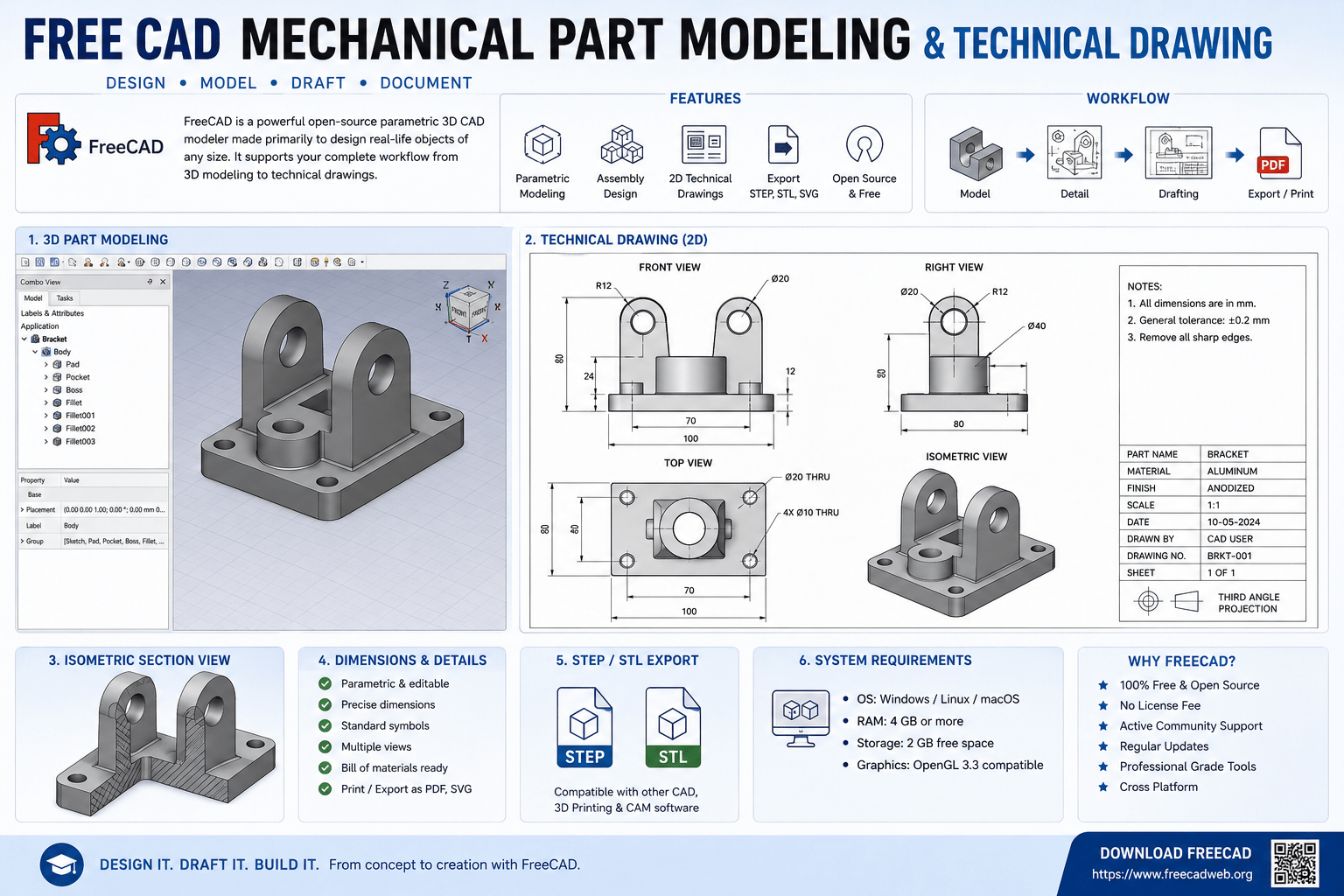
Introduction
The world of 3D design has long been dominated by expensive, proprietary software. For years, aspiring engineers, small businesses, and hobbyists faced a difficult choice: invest thousands of dollars in professional CAD tools or struggle with limited, free alternatives that lacked essential features. That landscape has changed dramatically.
FreeCAD has emerged as a powerful, professional-grade alternative to expensive CAD software. As a no-cost solution, it empowers you to create intricate 3D models, transforming your creative visions into reality. It offers the capabilities that engineers and designers need—parametric modeling, assembly design, and technical drawing creation—without the financial barrier.
The Mechanical Part Modeling & Technical Drawing in FreeCAD course is designed for users who want to master this powerful open-source platform. With 36 hours 54 minutes of comprehensive instruction across 115 lectures and 8 chapters, it takes you from a beginner to an adept user. Whether you are an engineer, product designer, or hobbyist, this training will equip you with the tools to create complex, production-ready models using FreeCAD’s powerful open-source platform.
This guide provides a comprehensive overview of what FreeCAD is, why it matters for mechanical design, what the course covers, and how you can begin your journey toward becoming a professional FreeCAD user.
What Is FreeCAD?
FreeCAD is a free and open-source parametric 3D CAD (Computer-Aided Design) modeler. It is designed for mechanical engineering and product design but also finds applications in architecture, civil engineering, and other engineering fields.
The Core Concept
FreeCAD is built on the principles of parametric modeling. This means that the geometry of your model is driven by parameters—dimensions, constraints, and relationships—that can be modified at any time. When you change a parameter, the entire model updates automatically. This is the same powerful approach used by expensive commercial CAD software like SolidWorks and Autodesk Inventor.
The Workbench Architecture
FreeCAD uses a workbench architecture, where different workbenches provide specialized tools for different tasks:
- Part Design Workbench: For creating 3D solid models of mechanical parts
- Sketcher Workbench: For creating 2D sketches that form the basis of 3D models
- Assembly Workbenches (A2Plus, Assembly4): For assembling multiple parts into complete products
- TechDraw Workbench: For creating professional 2D technical drawings from 3D models
- FEM Workbench: For finite element analysis and simulation
Why FreeCAD Matters
Cost-Effective Solution
FreeCAD is a cost-effective solution for small-scale industries to reduce their operation cost. It eliminates the need for expensive software licenses, making professional-grade CAD accessible to everyone.
Growing Community and Ecosystem
FreeCAD has a large and growing community of users and developers. This means extensive documentation, tutorials, and third-party resources are available.
Parametric Power
FreeCAD offers the same parametric modeling capabilities found in expensive commercial software. This enables professional-grade design workflows.
No Vendor Lock-In
Because FreeCAD is open-source, your files are not tied to a proprietary format. This ensures long-term access to your designs.
Why Mechanical Part Modeling and Technical Drawing Skills Matter
The Foundation of Product Development
Mechanical part modeling is the process of creating digital 3D representations of mechanical components. These models serve as the foundation for product development, enabling engineers to visualize designs, test functionality, and prepare for manufacturing.
Technical Drawings: The Language of Manufacturing
Technical drawings are the universal language of manufacturing. They communicate design intent to machinists, fabricators, and quality inspectors. In FreeCAD, the TechDraw workbench enables you to create professional 2D drawings from your 3D models.
Career Opportunities
Proficiency in FreeCAD opens doors to roles including:
- Mechanical Designer
- Product Design Engineer
- CAD Technician
- Freelance Designer
- 3D Printing Specialist
- Small Business Owner
The Transition from Paid Software
Many professionals are transitioning from paid software like SolidWorks and Autodesk Inventor to FreeCAD. The course is designed to help you easily switch from paid software to open-source FreeCAD for modeling, assembly, drafting, detailing, and 3D printing.
What the Course Covers
The Mechanical Part Modeling & Technical Drawing in FreeCAD course is a comprehensive, professional-grade training program designed by a mechanical engineer with solid command over CAD software like FreeCAD, SolidWorks, Autodesk Inventor, and AutoCAD Mechanical.
Course Overview
| Feature | Detail |
|---|---|
| Total Duration | 36 hours 54 minutes |
| Number of Lectures | 115 lectures |
| Number of Chapters | 8 chapters |
| Language | English |
| Instructor | Amar Patel – Mechanical Engineer |
| Student Enrollment | 51+ students |
| Last Updated | June 2026 |
What You Will Learn
Master FreeCAD Fundamentals
You will acquire profound proficiency in FreeCAD’s tools, functions, and interface to effortlessly excel in 3D modeling. The course starts with FreeCAD installation and customization, covering all major topics of FreeCAD.
Generating Varied 3D Models
You will skillfully design mechanical parts and product prototypes from the ground up with FreeCAD. The course covers Part Modeling in FreeCAD, including advanced modeling techniques, precision detailing, and efficient workflow optimization.
Accurate Dimensioning and Sketching
You will learn to accurately dimension your model for precision modeling in FreeCAD’s Sketcher workbench. This is essential for creating manufacturable parts.
Assembly Design
You will learn assembly modeling using FreeCAD’s assembly workbenches including A2Plus and Assembly4. This enables you to create complete product assemblies from individual parts.
Technical Drawing Creation
You will learn to create professional manufacturing drawings using FreeCAD’s TechDraw workbench. This includes creating views, adding dimensions, and preparing documentation for production.
3D Printing Preparation
The course covers preparing models for 3D printing, including generating STL files and ensuring print-ready geometry.
Course Content Highlights
The course includes 8 chapters with 115 lectures, covering:
- Introduction to FreeCAD 1.0 and its benefits over other CAD software
- FreeCAD 1.0 installation and overview of the FreeCAD user interface
- Exploring the basics of FreeCAD
- Multiple-choice questions on new features in FreeCAD 1.0
- Advanced modeling techniques for complex mechanical parts
- Precision detailing and efficient workflow optimization
- Assembly design with A2Plus and Assembly4 workbenches
- Professional technical drawing creation with TechDraw
Enrol in Mechanical Part Modeling & Technical Drawing in FreeCAD Now
Who Should Take This Course
Mechanical Engineers
Mechanical engineers who want to add FreeCAD to their skillset or transition from paid software will find this course invaluable. It provides a smooth transition from paid software to open-source FreeCAD.
Product Designers
Product designers who need to create 3D models and technical drawings for manufacturing will develop practical, professional-grade skills.
Hobbyists and Makers
Hobbyists interested in 3D printing and mechanical design will gain the skills to create their own designs from scratch.
Engineering Students
Students who want to build practical CAD skills without the expense of commercial software will benefit from this comprehensive training.
Small Business Owners
Small business owners who need to design products but cannot afford expensive CAD licenses will find FreeCAD a cost-effective solution.
Intermediate FreeCAD Users
The course is designed for intermediate users who want to take their FreeCAD expertise to the next level. It focuses on advanced modeling techniques, precision detailing, and efficient workflow optimization.
Requirements
The course has specific requirements:
No prior experience with other 3D modeling software is strictly required, but basic FreeCAD familiarity is expected.
Frequently Asked Questions
What is FreeCAD?
FreeCAD is a free and open-source parametric 3D CAD modeler. It is designed for mechanical engineering and product design and offers capabilities comparable to expensive commercial CAD software.
Is FreeCAD really free?
Yes. FreeCAD is completely free and open-source. There are no licensing fees, subscription costs, or hidden charges.
Can FreeCAD replace SolidWorks?
For many applications, yes. FreeCAD offers parametric modeling, assembly design, and technical drawing capabilities similar to SolidWorks. While there may be differences in specific features and workflows, FreeCAD is a viable alternative for many users.
What is the difference between FreeCAD and other CAD software?
FreeCAD is open-source and free. It offers similar parametric modeling capabilities to commercial software but with a different interface and workflow. The course helps you understand the differences between FreeCAD and other 3D CAD programs.
Do I need prior CAD experience to take this course?
Basic knowledge of FreeCAD is required. The course is designed for intermediate users who want to advance their skills.
How long is the course?
The course includes 36 hours 54 minutes of video content across 115 lectures and 8 chapters.
What will I be able to do after completing this course?
You will be able to skillfully design mechanical parts and product prototypes, create professional technical drawings, assemble complex products, prepare models for 3D printing, and confidently use FreeCAD for professional design work.
Which course should I choose for learning FreeCAD?
A comprehensive course covering part modeling, assembly, and technical drawing is ideal. The Mechanical Part Modeling & Technical Drawing in FreeCAD course provides exactly this comprehensive training with 36 hours of expert instruction.
Mastering FreeCAD: Your Next Step
FreeCAD is transforming the CAD landscape. It offers professional-grade capabilities without the professional-grade price tag. For engineers, designers, hobbyists, and small businesses, it represents an opportunity to access powerful design tools that were previously out of reach.
Learning FreeCAD presents a choice. You can struggle through fragmented tutorials and confusing documentation. Or you can take a structured, comprehensive course designed by a mechanical engineer with years of CAD experience.
The Mechanical Part Modeling & Technical Drawing in FreeCAD course provides exactly this structured approach. With 36 hours 54 minutes of expert instruction across 115 lectures and 8 chapters, you will develop the skills to:
- Skillfully design mechanical parts and product prototypes from the ground up
- Master FreeCAD’s tools, functions, and interface
- Accurately dimension models for precision modeling
- Create professional technical drawings for manufacturing
- Assemble complex products using A2Plus and Assembly4 workbenches
- Prepare models for 3D printing
- Transition smoothly from paid CAD software to open-source FreeCAD
The course starts from a foundation of basic FreeCAD knowledge and progresses to advanced techniques.
Enrol in Mechanical Part Modeling & Technical Drawing in FreeCAD Now
Recommended Related Courses
To build a comprehensive CAD and mechanical design skillset, consider these additional courses:
Complete FreeCAD Course : From Zero to Expert ! – Become an expert in 3D modeling, assembly, and technical drawing with comprehensive FreeCAD training.
FreeCAD for Mechanical Engineers : Technical 2D Drawing – Specialized training for creating professional technical 2D drawings in FreeCAD.
Complete FreeCAD Mastery for Mechanical Design & 3D Printing – Master FreeCAD for mechanical design and 3D printing applications.
FreeCAD 1.0 in 25 Days: Complete CAD Course – A structured 25-day approach to mastering FreeCAD 1.0 with 25 projects.
Mechanical Engineering-Machine Designing-1 – Build foundational machine design knowledge to complement your CAD skills.
Basics of Mechanical Design Engineering (2022) – Understand the fundamentals of mechanical design engineering.
Mechanical concept design : Stress simulation in Fusion 360 – Learn stress simulation to validate your mechanical designs.
Learn Fusion 360 with Real-World Mechanical Projects – Develop practical Fusion 360 skills for product design.
Final Thoughts
FreeCAD is democratizing access to professional-grade CAD software. For the first time, engineers, designers, and hobbyists can access powerful parametric modeling, assembly design, and technical drawing tools without the barrier of expensive software licenses. FreeCAD has lots of potential than traditional 3D software available in the market.
The journey to mastering FreeCAD starts with the right training. The Mechanical Part Modeling & Technical Drawing in FreeCAD course provides the comprehensive, expert-led instruction you need to develop professional-grade skills. With 36 hours of content, 115 lectures, and hands-on practice, it is the ideal resource for anyone serious about mastering FreeCAD.
Start your FreeCAD journey today.
Enrol in Mechanical Part Modeling & Technical Drawing in FreeCAD
About the Author