

 Edu_Admin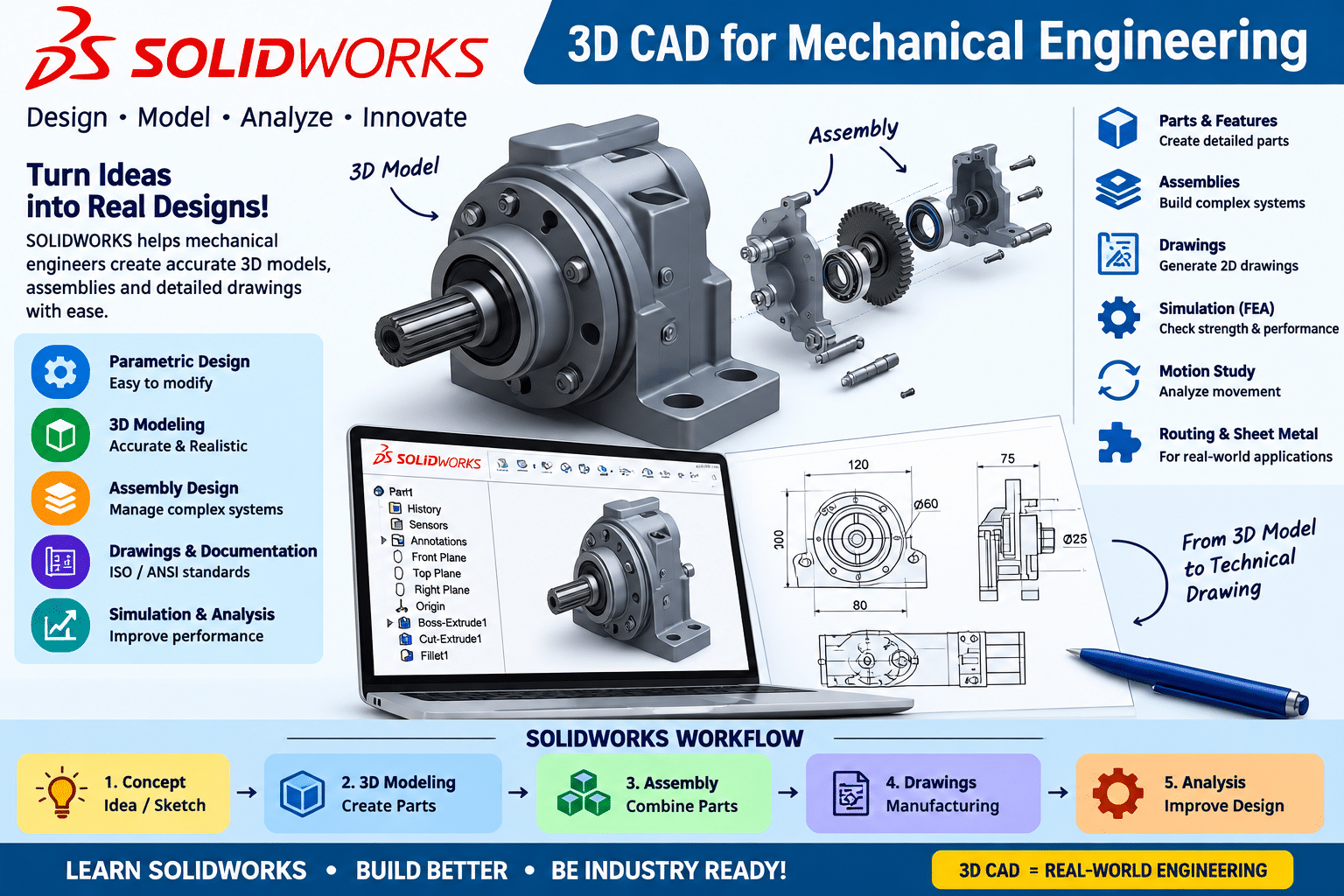
In the modern engineering world, the ability to create accurate, SOLIDWORKS 3D models is not just a skill—it is a necessity. From the smallest consumer product to the largest industrial machine, every manufactured item begins as a digital design. And among the software tools that make this possible, one name stands above the rest: SOLIDWORKS.
SOLIDWORKS is the industry-standard 3D CAD software used by mechanical engineers, product designers, and manufacturing professionals worldwide. It is the tool that transforms ideas into manufacturable designs, enabling engineers to visualize concepts, test functionality, and create the documentation required for production. Proficiency in SOLIDWORKS is one of the most valuable skills a mechanical engineer can possess.
Yet for many students and professionals, learning SOLIDWORKS can seem daunting. The interface is vast. The tools are numerous. The workflow appears complex. Where does one even begin?
The truth is that SOLIDWORKS is remarkably intuitive when taught correctly. Its parametric, feature-based approach to design mirrors the way engineers naturally think about creating products. Once you understand the fundamental workflow—sketch, feature, assemble, document—the entire software becomes accessible and powerful.
The SOLIDWORKS 3D CAD for Mechanical Engineering course is designed precisely for this purpose. It provides comprehensive training in SOLIDWORKS for mechanical engineering applications, taking you from the fundamentals to professional-level proficiency.
This guide provides a comprehensive overview of what SOLIDWORKS is, why it matters for mechanical engineers, what the course covers, and how you can begin your journey toward mastering this essential engineering tool.
What Is SOLIDWORKS?
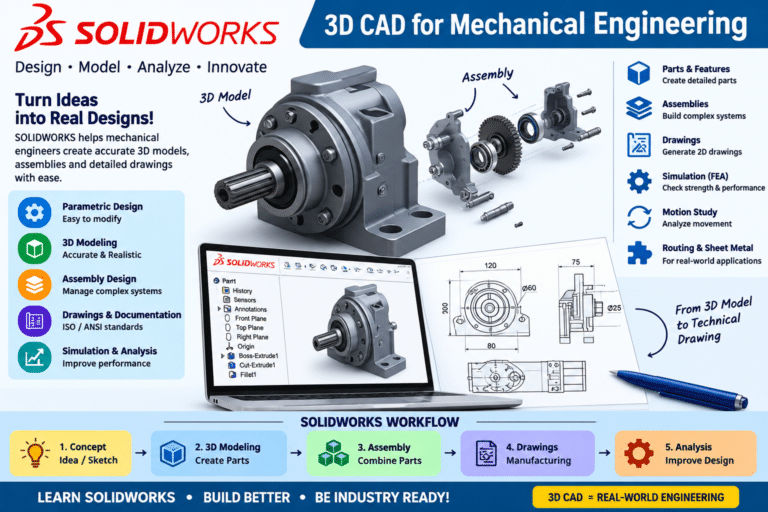
SOLIDWORKS is a solid modelling computer-aided design (CAD) and computer-aided engineering (CAE) software developed by Dassault Systèmes. It is used for creating 3D models, assemblies, and 2D drawings for product design and manufacturing.
The Core Concept
SOLIDWORKS uses a parametric, feature-based approach to design. This means that designs are created through a series of features—extrusions, cuts, revolves, fillets—that are driven by dimensions and relationships. When a dimension changes, the entire model updates automatically. This approach mirrors the way engineers think about design, making SOLIDWORKS both powerful and intuitive.
Key Capabilities of SOLIDWORKS
Part Modeling
SOLIDWORKS enables engineers to create complex 3D parts using a variety of modelling techniques:
- Sketch-based features (extrude, revolve, sweep, loft)
- Applied features (fillet, chamfer, shell, draft)
- Pattern and mirror features
- Reference geometry (planes, axes, coordinate systems)
Assembly Design
The software provides powerful tools for creating assemblies:
- Mating components together
- Creating exploded views
- Checking for interference
- Managing large assemblies
- Creating assembly configurations
Engineering Drawings
SOLIDWORKS automatically generates 2D drawings from 3D models:
- Creating views (standard, projected, section, detail)
- Adding dimensions and annotations
- Generating bills of materials
- Creating title blocks and sheets
Sheet Metal Design
The software includes dedicated tools for sheet metal design:
- Creating sheet metal parts
- Adding bends, flanges, and corners
- Generating flat patterns
- Calculating bend allowances
Weldments
SOLIDWORKS provides tools for designing welded structures:
- Creating structural members
- Adding weld beads
- Generating cut lists
Simulation
SOLIDWORKS includes simulation capabilities for:
- Static stress analysis
- Frequency analysis
- Thermal analysis
- Flow simulation
Why SOLIDWORKS Matters for Mechanical Engineers
Industry Standard
SOLIDWORKS is one of the most widely used CAD software packages in the world. It is used across industries including automotive, aerospace, consumer products, medical devices, and manufacturing. Proficiency in SOLIDWORKS is a skill that employers actively seek and value.
Career Opportunities
SOLIDWORKS skills open doors to a wide range of roles:
- Design Engineer
- Mechanical Design Engineer
- Product Development Engineer
- CAD Designer
- Manufacturing Engineer
- R&D Engineer
Complete Design Workflow
SOLIDWORKS provides a complete design-through-manufacturing workflow. From the initial concept to the final drawing, everything can be done within a single software environment.
Design Validation
The integrated simulation capabilities enable engineers to validate designs virtually, identifying potential failures before manufacturing.
Industry Certification
SOLIDWORKS offers professional certification (CSWA, CSWP) that validates your skills and enhances your credentials in the job market.
What the Course Covers
The SOLIDWORKS 3D CAD for Mechanical Engineering course provides comprehensive, practical training in SOLIDWORKS for mechanical engineering applications.
Course Overview
| Feature | Detail |
|---|---|
| Category | 3D CAD |
| Focus | SOLIDWORKS for Mechanical Engineering |
| Target Audience | Mechanical engineering students, design engineers, CAD beginners |
| Software | SOLIDWORKS |
| Level | Fundamentals to Advanced |
| Certificate | Upon completion |
What You Will Learn
SOLIDWORKS Interface and Navigation
You will become familiar with the SOLIDWORKS interface, including:
- Understanding the user interface
- Navigating in 3D space
- Using the FeatureManager design tree
- Accessing tools and commands
Sketching Fundamentals
You will learn to create 2D sketches, the foundation of all 3D models:
- Creating sketch geometry
- Adding dimensions and relations
- Using sketch tools (trim, offset, mirror)
- Fully defining sketches
Part Modelling
You will learn to create 3D parts using a variety of techniques:
- Extrude and revolve features
- Sweep and loft features
- Fillets, chamfers, and shells
- Patterns and mirrors
- Reference geometry
Assembly Design
You will learn to create assemblies:
- Inserting components
- Adding mates
- Creating exploded views
- Checking for interference
- Managing large assemblies
Engineering Drawings
You will learn to create professional 2D drawings:
- Creating drawing views
- Adding dimensions and annotations
- Generating bills of materials
- Creating title blocks
Advanced Topics
The course may also cover:
- Sheet metal design
- Weldments
- Design tables and configurations
- Introduction to simulation
Practical Projects
You will work through practical projects and exercises, reinforcing your learning with real-world applications.
Enrol in SOLIDWORKS 3D CAD for Mechanical Engineering Now
Why SOLIDWORKS Skills Matter for Your Career
Foundation of Modern Engineering
SOLIDWORKS is the tool that mechanical engineers use to create the products of tomorrow. Proficiency in SOLIDWORKS is not just a skill—it is a fundamental competency for modern engineering practice.
Career Advancement
SOLIDWORKS skills are highly valued in the job market. Engineers who can create accurate, detailed 3D models command premium salaries and have access to more challenging and rewarding positions.
Design Efficiency
SOLIDWORKS enables engineers to design faster and more accurately. The parametric, feature-based approach ensures that changes propagate throughout the design, reducing errors and improving efficiency.
Industry Applications
SOLIDWORKS is used across industries:
- Automotive: Vehicle components, assemblies, tooling
- Aerospace: Aircraft structures, engine components
- Consumer Products: Electronics enclosures, appliances
- Medical Devices: Surgical instruments, implants
- Manufacturing: Machine design, fixtures, tooling
Certification and Credentials
SOLIDWORKS offers professional certification (CSWA, CSWP) that validates your skills and enhances your credentials. These certifications are recognized by employers worldwide and can significantly improve your job prospects.
Who Should Take This Course
Mechanical Engineering Students
Students who want to build practical CAD skills will find this course invaluable. It provides the foundation for a career in design engineering.
Design Engineers
Design engineers who want to add SOLIDWORKS to their skillset or refresh their knowledge will benefit from the comprehensive coverage.
CAD Beginners
Those new to CAD will find this course accessible and well-structured, starting from the fundamentals and building systematically.
Product Designers
Product designers who need to create 3D models and technical documentation will develop practical, job-ready skills.
Engineering Graduates
Graduates entering the job market will find SOLIDWORKS skills essential for many engineering positions.
Professionals Seeking to Upskill
Working engineers who want to learn SOLIDWORKS or improve their existing skills will find this course a valuable resource.
Requirements
The course has specific requirements:
- SOLIDWORKS software installed – Access to SOLIDWORKS for practice
- Basic computer skills – Familiarity with Windows operating system
- Basic engineering knowledge – Understanding of fundamental engineering concepts
- Willingness to learn – A drive to master 3D CAD
No prior CAD experience is required. The course starts from the fundamentals.
Frequently Asked Questions
What is SOLIDWORKS?
SOLIDWORKS is a solid modelling computer-aided design (CAD) software used for creating 3D models, assemblies, and 2D drawings for product design and manufacturing.
What is the difference between SOLIDWORKS and other CAD software?
SOLIDWORKS is a parametric, feature-based CAD software. It is one of the most widely used CAD packages in industry, known for its intuitive interface and powerful capabilities. While similar in concept to other CAD software like AutoCAD and Fusion 360, SOLIDWORKS has its own unique interface and workflow.
Do I need prior CAD experience to take this course?
No. The course starts from the fundamentals. No prior CAD experience is required.
How long does it take to learn SOLIDWORKS?
With focused study and practice, you can become proficient in SOLIDWORKS within a few months. The fundamentals can be learned in a few weeks.
What is the difference between SOLIDWORKS and AutoCAD?
AutoCAD is primarily a 2D drafting tool with some 3D capabilities. SOLIDWORKS is a 3D parametric modelling tool designed specifically for mechanical design. They serve different purposes and are often used together in industry.
What certifications are available for SOLIDWORKS?
SOLIDWORKS offers professional certifications including Certified SOLIDWORKS Associate (CSWA) and Certified SOLIDWORKS Professional (CSWP).
Will I receive a certificate upon completion?
Yes. Udemy provides a certificate of completion for this course.
What career opportunities does this course prepare me for?
This course prepares you for roles including Design Engineer, Mechanical Design Engineer, Product Development Engineer, CAD Designer, and Manufacturing Engineer.
Mastering SOLIDWORKS: Your Next Step
SOLIDWORKS is one of the most powerful and widely used CAD software packages in the world. It is the tool that mechanical engineers use to create the products that shape our world. Proficiency in SOLIDWORKS is not just an advantage—it is an essential skill for modern engineering practice.
The SOLIDWORKS 3D CAD for Mechanical Engineering course provides the comprehensive, practical training you need to master this essential tool. You will develop the skills to:
- Create complex 3D parts using parametric, feature-based modelling
- Design complete assemblies with mates and exploded views
- Generate professional engineering drawings
- Create sheet metal parts and weldments
- Validate designs through simulation
- Build a portfolio of design projects
The course starts from the fundamentals and builds your skills systematically. No prior CAD experience is required.
Enrol in SOLIDWORKS 3D CAD for Mechanical Engineering Now
Recommended Related Courses
To build a comprehensive CAD and mechanical design skillset, consider these additional courses:
Learn SolidWorks Mechanical Beginner to Advanced Guide – Comprehensive SolidWorks training from beginner to advanced level.
SOLIDWORKS Mechanical Design & Assemblies Masterclass – Master mechanical design and assemblies in SOLIDWORKS.
Mechanical Design via SolidWorks – Learn mechanical design principles through SolidWorks.
Mechanical Engineering-Machine Designing-1 – Build foundational machine design knowledge.
Mechanical Engineering Design – The Ultimate Course – Comprehensive coverage of mechanical engineering design theory and practice.
Basics of Mechanical Design Engineering (2022) – Understand the fundamentals of mechanical design engineering.
Mechanical concept design : Stress simulation in Fusion 360 – Learn stress simulation to validate your designs.
AutoCAD Mechanical 2D and 3D for Beginners to Advanced – Broaden your CAD skills with AutoCAD Mechanical.
Final Thoughts
SOLIDWORKS is more than just software—it is the language of modern mechanical design. It is the tool that transforms ideas into manufacturable products, enabling engineers to create the innovations that shape our world. Proficiency in SOLIDWORKS is not optional for mechanical engineers—it is essential.
The journey to mastering SOLIDWORKS starts with a single step: learning the fundamentals from a structured, comprehensive course. The SOLIDWORKS 3D CAD for Mechanical Engineering course provides that foundation, guiding you from beginner to confident user with practical, hands-on training.
Start your SOLIDWORKS journey today.
Enrol in SOLIDWORKS 3D CAD for Mechanical Engineering
About the Author