

 Edu_Admin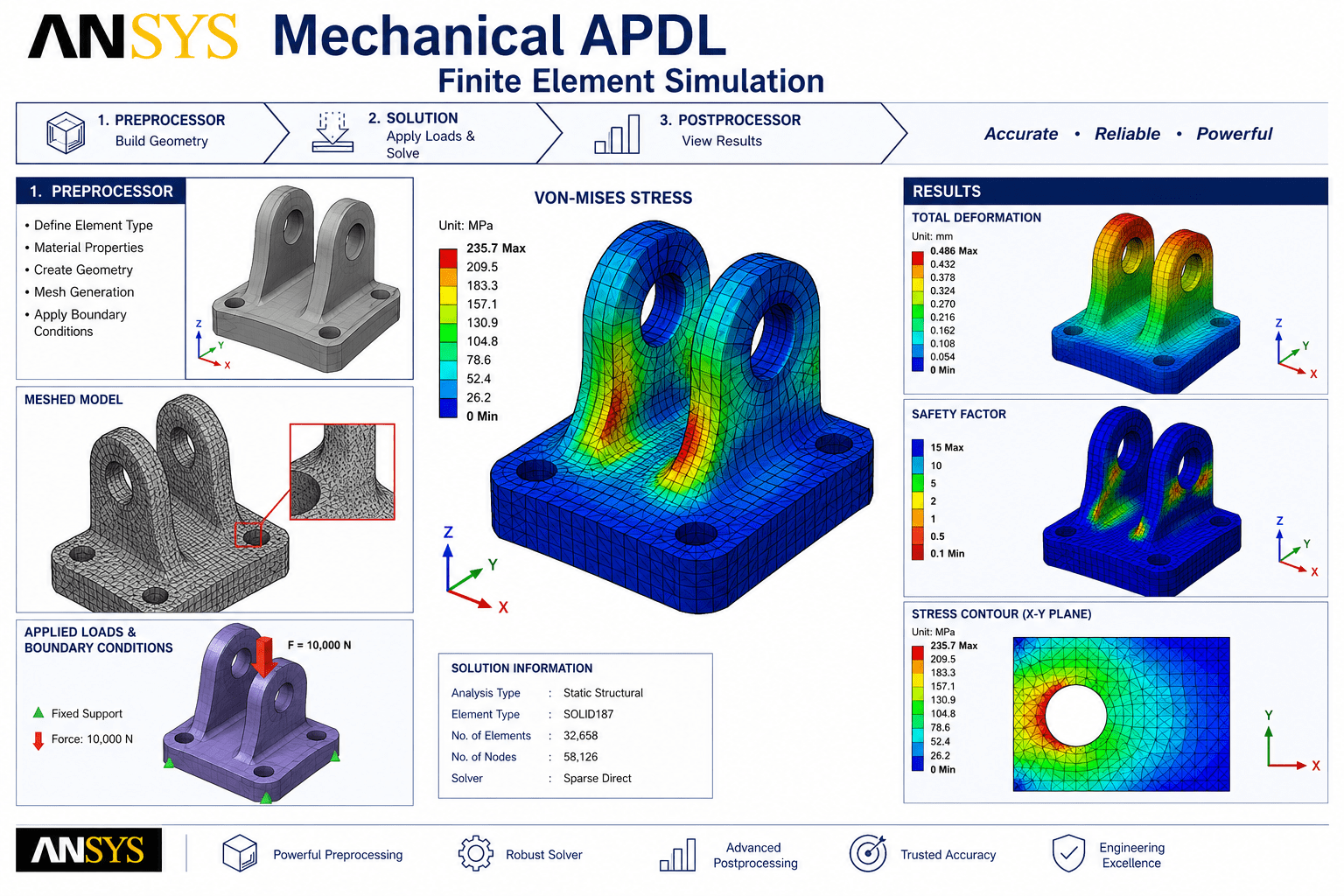
Introduction
ANSYS Mechanical APDL finite element simulationhas revolutionised engineering design and analysis. What was once the domain of research laboratories and specialised consulting firms is now an essential tool for engineers across industries. Among the software packages that enable this transformation, ANSYS Mechanical APDL stands as one of the most powerful and widely used platforms.
ANSYS is one of the most widely used finite element analysis software packages in the world. For decades, engineers have relied on ANSYS Mechanical APDL to solve complex structural, thermal, and multiphysics problems that would be impossible to address through analytical methods alone.
Yet many engineers find ANSYS Mechanical APDL intimidating. The interface appears complex. The command language seems cryptic. The sheer number of options and capabilities can be overwhelming.
This perception is understandable but misleading. ANSYS Mechanical APDL is actually a remarkably logical and powerful tool. Once you understand its fundamental structure and workflow, it becomes an invaluable asset for engineering analysis and design.
This guide provides a comprehensive introduction to ANSYS Mechanical APDL for finite element simulation. It covers what the software does, why it matters, its key capabilities, how it compares to other ANSYS products, and how to begin your learning journey.
What Is ANSYS Mechanical APDL?
ANSYS Mechanical APDL (ANSYS Parametric Design Language) is a comprehensive finite element analysis software package developed by ANSYS Inc. It provides a complete environment for structural and thermal analysis, including pre-processing, solution, and post-processing capabilities.
The “APDL” designation refers to the parametric design language that underlies the software. This command-based approach gives engineers unprecedented control over every aspect of the simulation process, from geometry creation to result interpretation.
Key Characteristics
- Command-Driven Interface: APDL operates through a powerful command language that enables complete control over analysis parameters
- Parametric Capability: The software supports parameterisation of models, making it ideal for design optimisation and parametric studies
- Comprehensive Solver Suite: Includes multiple solver technologies for different types of analyses
- Extensive Element Library: Supports a wide range of element types for different physical problems
- Scripting and Automation: Enables automation of repetitive tasks and complex workflows
Why ANSYS Mechanical APDL Matters
Industry Standard Status
ANSYS is one of the most trusted and widely adopted FEA software packages in the world. It is used across industries including aerospace, automotive, energy, manufacturing, civil engineering, and biomedical engineering.
Unmatched Capability
ANSYS Mechanical APDL provides capabilities that extend far beyond basic structural analysis. It supports:
- Linear and nonlinear structural analysis
- Thermal analysis (steady-state and transient)
- Modal, harmonic, and transient dynamics
- Multiphysics coupling
- Advanced material models
- Contact and nonlinearities
Parametric Power
The APDL command language enables powerful parametric modelling. Engineers can define parameters for geometry, materials, loads, and boundary conditions, then easily modify these parameters to explore design variations. This capability is invaluable for design optimisation and sensitivity studies.
Control and Precision
Unlike some modern graphical interfaces, APDL gives engineers direct control over every aspect of the analysis. This level of control ensures that experienced users can achieve the highest possible accuracy and reliability in their simulations.
Career Value
Proficiency in ANSYS Mechanical APDL is highly valued by employers. Engineers with strong ANSYS skills command premium salaries and have access to more challenging and rewarding positions.
Core Capabilities of ANSYS Mechanical APDL
Structural Analysis
ANSYS Mechanical APDL provides comprehensive capabilities for structural analysis:
- Static Analysis: Linear and nonlinear static structural analysis
- Modal Analysis: Natural frequency and mode shape determination
- Harmonic Analysis: Steady-state response to harmonic loading
- Transient Analysis: Time-dependent response to dynamic loading
- Nonlinear Analysis: Material nonlinearities, geometric nonlinearities, and contact
Thermal Analysis
The software supports both steady-state and transient thermal analysis:
- Heat conduction, convection, and radiation
- Temperature-dependent material properties
- Phase change and latent heat effects
- Thermal-stress coupling
Advanced Capabilities
- Multibody Dynamics: Analysis of flexible components in multibody systems
- Composite Materials: Analysis of layered composite structures
- Contact Analysis: Advanced contact modelling including wear and fluid penetration
- GPU Acceleration: Enhanced performance through GPU acceleration
Post-Processing
Extensive post-processing capabilities are available to interpret analysis results:
- Contour plots and vector displays
- Path plots and result queries
- Animation of results
- Result extraction and reporting
ANSYS Mechanical APDL vs ANSYS Workbench
Many engineers wonder about the relationship between ANSYS Mechanical APDL and ANSYS Workbench. Understanding the difference is important for choosing the right tool for your needs.
ANSYS Mechanical APDL
- Command-Driven: Operates primarily through text commands and scripting
- Maximum Control: Provides direct control over every aspect of the analysis
- Parametric Power: Excellent for parameterisation and automation
- Quality Assurance: Will not proceed to results if mesh quality is inappropriate, ensuring result quality
- Steeper Learning Curve: Requires understanding of commands and syntax
- Preferred by: Experienced users, researchers, and those requiring maximum control
ANSYS Workbench
- Graphical Interface: User-friendly, point-and-click environment
- CAD Integration: Easy integration with modern CAD packages with associativity
- Automation: Automated contact detection and other capabilities
- Ease of Use: More accessible to beginners
- Geometry Handling: Superior for complex曲面 and assembly models
- Preferred by: Design engineers, those requiring rapid analysis, and beginners
Which Should You Choose?
The choice depends on your needs:
- Choose APDL if you need maximum control, are performing parametric studies, or require scripted automation
- Choose Workbench if you prefer a graphical interface, need rapid analysis, or are new to FEA
Many organisations use both tools. APDL provides the power and flexibility for complex analyses, while Workbench offers efficiency for routine work.
Learning ANSYS Mechanical APDL
The Learning Path
Stage 1: Fundamentals (Weeks 1-2)
Start with the basics of finite element analysis and the ANSYS Mechanical APDL interface. Understand the workflow: pre-processing, solution, and post-processing. Learn basic commands for geometry creation, meshing, and result visualisation.
Stage 2: Core Analysis Types (Weeks 3-5)
Develop proficiency in core analysis types:
- Linear static structural analysis
- Modal analysis
- Steady-state thermal analysis
- Transient thermal analysis
Work through tutorials covering problems involving truss, plane stress, plane strain, axisymmetric, solid, beam, and plate structural elements.
Stage 3: Advanced Topics (Weeks 6-8)
Progress to advanced capabilities:
- Nonlinear analysis
- Contact modelling
- Dynamic analysis
- Coupled field analysis
- Parametric studies and optimisation
Stage 4: APDL Programming (Weeks 9-12)
Master the APDL command language for automation and advanced applications:
- Script writing and parameterisation
- Macro development
- Customisation and automation
- Integration with other tools
Recommended Resources
Books
- “ANSYS Tutorial Release 2025: Structural & Thermal Analysis Using the ANSYS Mechanical APDL Release 2025 Environment” by Kent L. Lawrence- Contains eight step-by-step tutorials progressing from simple to complex
Online Courses
A structured online course provides the most efficient path to proficiency. The ANSYS mechanical APDL for Finite Element Simulation course offers comprehensive training from basics to advanced level, covering analysis of bar members, bending of beams, and more.
Enrol in ANSYS mechanical APDL for Finite Element Simulation Now
Frequently Asked Questions
What is the difference between ANSYS Mechanical APDL and ANSYS Workbench?
ANSYS Mechanical APDL is command-driven and provides maximum control, while Workbench offers a user-friendly graphical interface with CAD integration. APDL is preferred for parametric studies and automation, while Workbench is more accessible for beginners.
Do I need prior FEA knowledge to learn ANSYS Mechanical APDL?
Basic understanding of finite element concepts is helpful but not strictly required. Many courses start from the fundamentals.
Is ANSYS Mechanical APDL difficult to learn?
The learning curve is steeper than graphical interfaces, but the software is logical and powerful. With proper training and practice, proficiency is achievable within a few months.
Which industries use ANSYS Mechanical APDL?
Aerospace, automotive, energy, manufacturing, civil engineering, biomedical engineering, and many others.
Can I automate analyses with ANSYS Mechanical APDL?
Yes. APDL’s command language enables powerful automation and scripting capabilities.
Which course should I choose for learning ANSYS Mechanical APDL?
A comprehensive course covering fundamentals to advanced topics is ideal. The ANSYS mechanical APDL for Finite Element Simulation course covers analysis of bar members, bending of beams, and more.
Mastering ANSYS Mechanical APDL: Your Next Step
Learning ANSYS Mechanical APDL presents a choice. You can struggle through dense documentation and fragmented online resources. Alternatively, you can take a structured course that guides you from fundamentals to advanced proficiency.
The ANSYS mechanical APDL for Finite Element Simulation course provides exactly this structured approach. The course includes:
- Comprehensive coverage from basics to advanced level
- Analysis of bar members and bending of beams
- Practical, hands-on experience with real engineering problems
- Foundation for further learning in FEA and simulation
The course starts from the fundamentals. No prior ANSYS experience is required.
Enrol in ANSYS mechanical APDL for Finite Element Simulation Now
Recommended Related Courses
To build a comprehensive simulation and analysis skillset, consider these additional courses:
FEA & CFD with ANSYS Mechanical & ANSYS Fluent – For Beginner – Comprehensive introduction to engineering simulation with ANSYS.
CFD Simulation Course, ANSYS Fluent for Mechanical Engineers – Computational fluid dynamics training for mechanical engineers.
Ansys Mechanical Intro – Full Anlatım – Comprehensive introduction to ANSYS Mechanical.
Finite Element ANSYS Mechanical (bahasa Indonesia) – Finite element analysis with ANSYS Mechanical.
Ansys Mechanical Fluent CFD Using Projects Beginner to Adv. – Project-based learning for ANSYS Fluent and Mechanical.
Mechanical concept design : Stress simulation in Fusion 360 – Stress simulation for mechanical concept design.
Final Thoughts
ANSYS Mechanical APDL is one of the most powerful finite element analysis tools available to engineers. Its command-driven interface, parametric capabilities, and comprehensive solver suite make it indispensable for complex engineering analysis.
The software enables engineers to solve problems that would be impossible through analytical methods alone. From structural integrity assessment to thermal management optimisation, ANSYS Mechanical APDL provides the tools needed for confident engineering decisions.
Start your ANSYS Mechanical APDL journey today with the right training and approach.
Enrol in ANSYS mechanical APDL for Finite Element Simulation
About the Author