
 Edu_Admin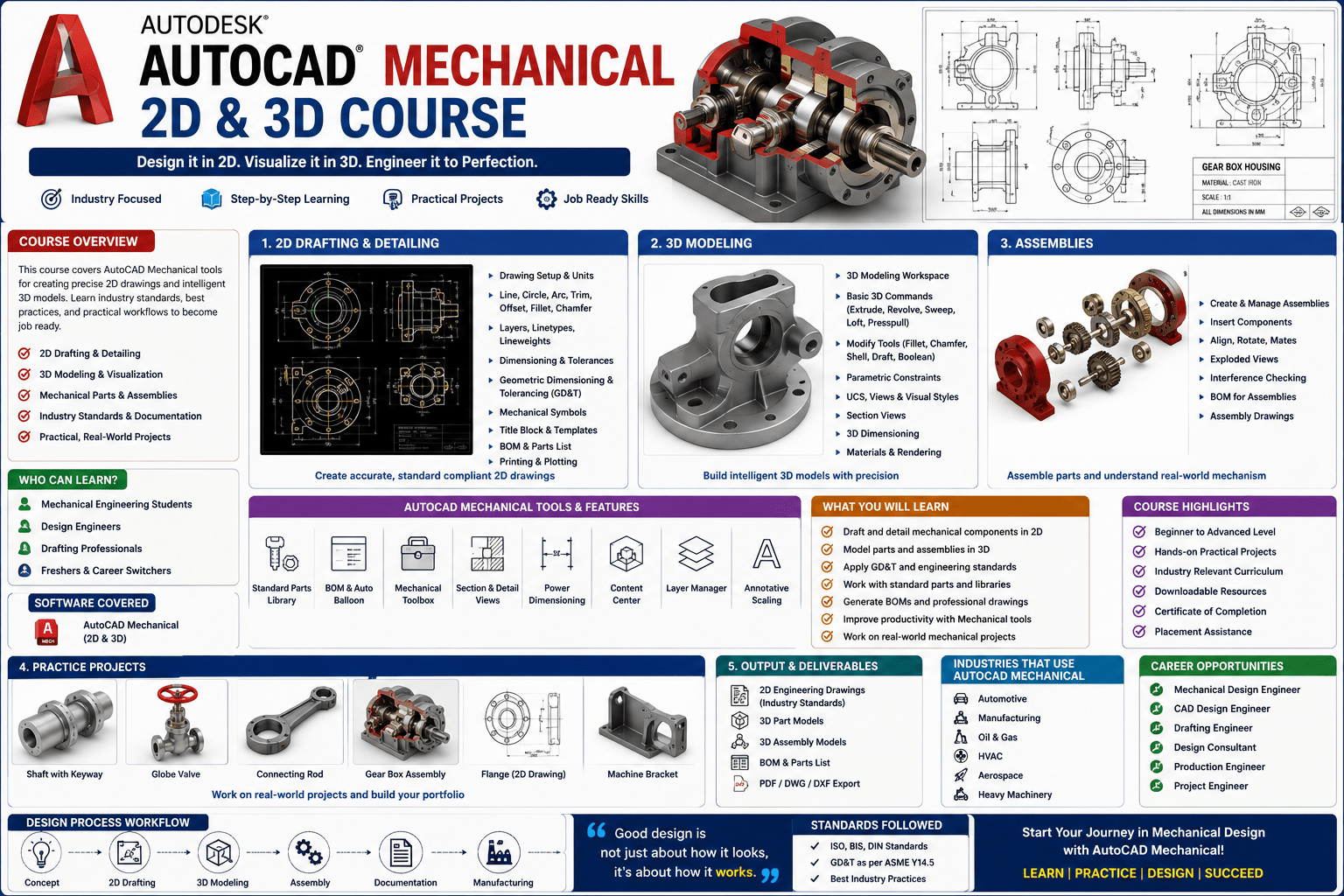
Introduction
AutoCAD is the language of mechanical design. Walk into any engineering office, manufacturing facility, or design studio, and you will find professionals using AutoCAD to create the drawings that become real products. It is the software that bridges the gap between an engineer’s vision and a manufacturable component.
Yet for many aspiring mechanical engineers and designers, AutoCAD can feel like a mountain to climb. The interface is vast. The commands are numerous. The journey from drawing a simple line to creating complex 3D mechanical assemblies seems impossibly long.
Here is the truth: AutoCAD is not difficult to learn when taught correctly. The key is a structured, step-by-step approach that builds skills progressively—from the simplest 2D commands to advanced 3D modeling techniques.
The AutoCAD Mechanical 2D and 3D course course provides exactly this structured approach. Designed by a decade-experienced instructor with an M.Tech in Design from NIT Kurukshetra, this comprehensive course has already helped thousands of students master AutoCAD from scratch.
This guide provides a comprehensive overview of what the course covers, why these skills matter for your career, and how you can begin your journey to becoming a confident AutoCAD professional.
What Is AutoCAD Mechanical?
AutoCAD Mechanical is specialised software designed specifically for mechanical engineering design and drafting. It builds upon the foundation of standard AutoCAD while adding industry-specific features for mechanical design, including:
- Standard mechanical parts libraries with bolts, screws, nuts, and washers
- Automated bill of materials generation
- Mechanical drafting standards compliance
- Power dimensioning tools
- Layer management systems
- Mechanical symbol libraries
The software supports both 2D drafting and 3D modeling, making it versatile for different engineering applications. For mechanical engineers, AutoCAD Mechanical is the tool that turns concepts into detailed, manufacturable designs.
Why AutoCAD Mechanical Skills Matter for Your Career
Industry Standard Tool
AutoCAD is one of the most widely used CAD software packages in the mechanical engineering industry. Proficiency in AutoCAD Mechanical is a skill that employers actively seek and value.
Career Opportunities
AutoCAD Mechanical skills open doors to a wide range of roles including:
- Mechanical Designer
- CAD Technician
- Design Engineer
- Product Development Engineer
- Manufacturing Engineer
- Automobile Design Engineer
As one course description notes, the skills you gain will “help you to get extra benefits to get better opportunity in future”.
Foundation for Advanced Design
Mastering AutoCAD Mechanical provides the foundation for more advanced design work, including parametric design, simulation, and integration with other engineering software.
Practical, Hands-On Skill
Unlike some engineering skills that remain theoretical, AutoCAD proficiency produces tangible results. The drawings you create become real products that people use every day.
What You Will Learn in This Comprehensive Course
The AutoCAD Mechanical 2D and 3D for Beginners to Advanced course is designed to take you from absolute beginner to confident, job-ready AutoCAD professional.
Course Overview
| Feature | Detail |
|---|---|
| Total Duration | 27 hours 44 minutes |
| Number of Lectures | 91 lectures |
| Number of Chapters | 3 chapters |
| Downloadable Resources | 33 resources |
| Practice Sets | 30+ practice sets |
| Software Version | AutoCAD 2021 |
| Instructor Experience | 10+ years |
| Student Enrollment | 13,000+ students |
| Instructor Qualification | M.Tech(Design) from NIT Kurukshetra |
What You Will Master
2D Drafting Fundamentals
You will start with the absolute basics, learning the foundational skills that every AutoCAD professional must master:
- All coordinate systems and their applications
- All basic commands and their uses
- Limits, units, and drawing setup
- Line commands and precision drafting
- Drawing setup and environment configuration
3D Modeling
You will progress to comprehensive 3D modeling, learning to create complex mechanical components:
- All 3D commands and their uses
- Creating 3D mechanical components including nuts, bolts, and spanners
- 3D mechanical assemblies and complex parts
- Converting 2D designs to 3D models
Practice and Application
The course includes more than 30 practice sets and assignments to help you consolidate your learning. These practical exercises ensure you can apply what you have learned to real mechanical design challenges.
Enrol in AutoCAD Mechanical 2D and 3D for Beginners to Advanced Now
Course Highlights
Designed by Industry Experts
The course is created by Ujjwal Tutorial – Keep You Ahead, a team of Mechanical Engineers with over 10 years of experience teaching CAD in universities, coaching centers, and colleges. The instructor holds an M.Tech(Design) from NIT Kurukshetra, bringing both academic rigor and practical industry knowledge.
From Scratch to Advanced Level
Whether you are a complete beginner or have some AutoCAD knowledge, this course is designed to help you at every level. The progression is logical and systematic, ensuring you build skills incrementally.
Comprehensive Coverage
The course covers both 2D and 3D comprehensively, making it a complete AutoCAD Mechanical training solution.
More Than 27 Hours of Content
With 27 hours 44 minutes of video content across 91 lectures, this course provides depth that shorter courses cannot match. You will have ample time to understand each concept thoroughly.
Practice-Focused Approach
More than 30 practice sets and assignments ensure you do not just watch—you actually learn by doing. This practical focus is what transforms passive viewing into active skill development.
Who Should Take This Course
Mechanical Engineering Students
Students studying mechanical engineering who want to add practical CAD skills to their academic knowledge will find this course invaluable. It bridges the gap between theory and practice.
Students Wanted to Learn Designing
Anyone who wants to learn designing from scratch will benefit from this structured, comprehensive course.
Students Wanted to Design Mechanical Components
If you want to design nuts, bolts, or mechanical components, this course teaches you exactly how.
Aspiring Design Engineers
Students who want to work in a design department or pursue a career as a design engineer will gain the skills they need.
Automobile Industry Aspirants
Students who want to work in the automobile industry as design engineers will find this course directly relevant.
Anyone Seeking to Add CAD Skills to Their Resume
As the course description notes, this training will “help you to add extra skills to your resume”. In a competitive job market, AutoCAD proficiency is a differentiator.
Requirements
The course has minimal requirements:
- A laptop that can run AutoCAD software
- AutoCAD software installed (trial version works)
- Basic computer skills
- A willingness to learn
No prior AutoCAD experience is necessary. This course is designed for complete beginners.
Frequently Asked Questions
What version of AutoCAD does this course cover?
The course covers AutoCAD 2021, which is an advanced version that includes all the features needed for professional mechanical design.
Do I need prior AutoCAD experience to take this course?
No. The course is designed for complete beginners and progresses systematically to advanced levels.
How long is the course?
The course includes 27 hours 44 minutes of video content across 91 lectures and 3 chapters.
Will I receive a certificate upon completion?
Yes. Udemy provides a certificate of completion for this course.
Is there a money-back guarantee?
Yes. The course has a full 30-day money-back guarantee.
What makes this course different from other AutoCAD courses?
This course is taught by a decade-experienced instructor with an M.Tech in Design from NIT Kurukshetra. It includes more than 27 hours of content, 91 lectures, 30+ practice sets, and comprehensive coverage of both 2D and 3D.
Can I watch the course on mobile devices?
Yes. The course can be watched on mobile devices and TVs.
Mastering AutoCAD Mechanical: Your Next Step
Learning AutoCAD Mechanical presents a choice. You can struggle through fragmented online tutorials and incomplete resources. Or you can take a structured, comprehensive course that guides you from beginner to advanced level with expert instruction.
The AutoCAD Mechanical 2D and 3D for Beginners to Advanced course provides exactly this structured approach. With 27 hours of comprehensive instruction across 91 lectures, you will develop the skills to:
- Master all 2D drafting commands and coordinate systems
- Create complex 3D mechanical models including nuts, bolts, and assemblies
- Apply your skills through 30+ practice sets and assignments
- Build a portfolio of mechanical designs
- Add valuable CAD skills to your resume
The course starts from the very basics. No prior AutoCAD experience is required.
Enrol in AutoCAD Mechanical 2D and 3D for Beginners to Advanced Now
Recommended Related Courses
To build a comprehensive AutoCAD and mechanical design skillset, consider these additional courses:
AutoCAD for Mechanical Design – Quick and Practical Projects – Build practical skills through project-based learning.
AutoCAD Mechanical : From Basics to Professional Drawings – Structured, job-oriented training for mechanical engineering professionals.
Complete AutoCAD 2021 Course: Both 2D and 3D – Mechanical – Complete AutoCAD training specifically for mechanical engineers.
Learn AutoCAD 2023 – 21 Mechanical 2D and 3D Complete Course – Updated course covering the latest AutoCAD features.
Mastering AutoCAD Mechanical 2026 with Real Examples – Advanced training with practical, real-world examples.
AutoCAD for Mechanical Engineer – Specialised AutoCAD training for mechanical engineers.
AutoCAD Mechanical with 100+ Drawings Practice – Extensive practice with over 100 drawing exercises.
Mechanical Engineering-Machine Designing-1 – Build foundational machine design knowledge to complement your CAD skills.
Final Thoughts
AutoCAD Mechanical is an essential tool for mechanical engineers and designers. It is the software that turns concepts into drawings, drawings into components, and components into the machines that power industry.
Mastering AutoCAD Mechanical is not just about learning software. It is about developing a skill that will serve you throughout your career. It is about being able to communicate your designs clearly and professionally. It is about being the engineer who can take an idea from concept to completion.
The AutoCAD Mechanical 2D and 3D for Beginners to Advanced course provides the comprehensive, structured training you need to build this essential skill. With 27 hours of expert instruction, 91 lectures, and 30+ practice sets, it is the complete package for anyone serious about becoming a CAD professional.
Start your AutoCAD journey today.
Enrol in AutoCAD Mechanical 2D and 3D for Beginners to Advanced
About the Author