


 Edu_Admin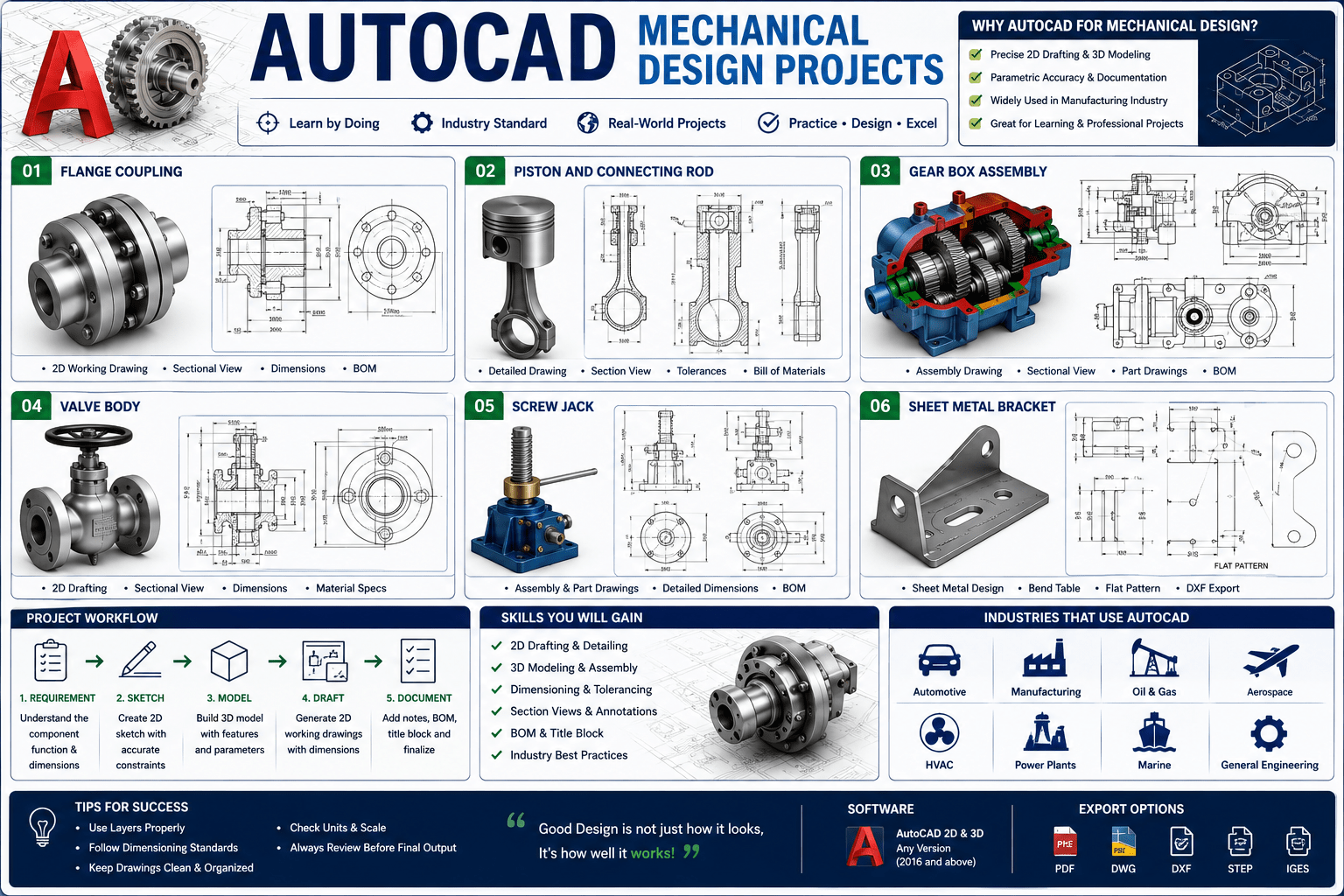
Introduction
Learning AutoCAD can be overwhelming. Endless commands. Confusing interfaces. Long, boring tutorials that never seem to get to the point. For many aspiring mechanical designers, the journey from beginner to confident AutoCAD user feels like an impossible climb.
But here is the truth: the best way to learn AutoCAD is not by memorising commands. It is by doing. By drawing. By creating real mechanical projects from scratch and learning the tools as you need them.
This is the philosophy behind the AutoCAD mechanical design projects course. With over 1,400 students already enrolled, this hands-on, project-based course has helped countless beginners gain the skills and confidence to open AutoCAD and start designing immediately.
This guide provides a comprehensive overview of what makes this course different, what you will learn, and why the project-based approach is the fastest way to master AutoCAD for mechanical design.
Why Traditional AutoCAD Learning Fails
Most AutoCAD courses follow the same flawed approach. They start with theory. They explain every command in isolation. They expect students to memorise hundreds of functions before ever creating a real drawing.
The result is predictable. Students become bored. They forget what they learned. They never develop the confidence to actually use AutoCAD in a professional context.
The problem is not the student. It is the method. Learning to use AutoCAD is like learning to ride a bicycle. You cannot learn it by reading a manual. You learn by getting on the bike, falling off, and trying again. You learn by doing.
The Project-Based Learning Approach
The AutoCAD for Mechanical Design – Quick & Practical Projects course takes a fundamentally different approach. Instead of memorising commands, you learn by creating real mechanical drawings from scratch.
Learn by Creating, Not by Memorising
The course is built around 20 fast-paced, hands-on exercises. Each lesson is short—typically 1.5 to 2 minutes—but packed with practical value. By the end, you will have created 20 mechanical sketches from scratch and gained real drafting confidence.
Bite-Sized Lessons for Busy Learners
Every video is designed to fit perfectly into your busy day. Lessons range from 1.5 to 7 minutes each, making it easy to learn in short, focused sessions. No fluff. No wasted time.
Zero to Hero Approach
The course takes you from your very first sketch to professional designs. You start with basic line commands and progress to complex mechanical drawings, building skills incrementally with each project.
What You Will Learn
The AutoCAD for Mechanical Design – Quick & Practical Projects course covers essential AutoCAD 2D tools and techniques through practical, real-world projects.
Master Essential 2D Tools
You will master key AutoCAD 2D tools including:
- Line, Rectangle, and Basic Shapes: The foundation of all mechanical drawings
- Array and Copy: Creating repeated patterns efficiently
- Trim, Offset, and Mirror: Editing and refining your designs
- Fillet: Creating smooth transitions between lines
- Overkill: Cleaning up overlapping geometry
- Parametric Tools and Constraints: Adding intelligence to your designs
- Linetypes and Scale Control: Professional drafting standards
Build Complete Mechanical Drawings
You will build complete mechanical drawings step by step using real-world examples. The course is packed with real-world examples of creating mechanical drawings, technical sketches, and professional 2D projects you can use right away.
Develop Practical Techniques
You will learn practical techniques that you will actually use in your work:
- Using AutoCAD’s calculator for precise positioning
- Comparing manual copy vs. array for efficiency
- Creating repeated shapes and patterns
- Combining horizontal and vertical lines
- Applying parametric and visual tools for clean drafting
Course Structure
The AutoCAD for Mechanical Design – Quick & Practical Projects course is organised into 16 chapters with 55 lectures, totalling 3 hours of content.
| Feature | Detail |
|---|---|
| Total Duration | 3 hours |
| Number of Lectures | 55 lectures |
| Number of Chapters | 16 chapters |
| Language | English |
| Student Enrollment | 1,400+ students |
| Last Updated | September 2025 |
Sample Lessons
- Drawing with Basic Line Commands (3:28)
- Creating Repeated Stair Shapes (1:25)
- Combining Horizontal and Vertical Lines (1:02)
- Using Rectangles and Rectangular Arrays (2:27)
- Comparing Manual Copy vs. Array (1:24)
- Using AutoCAD’s Calculator for Positioning (3:01)
What Makes This Course Different
Practical Projects First
Instead of starting with theory, the course puts projects first. You learn by creating, not by memorising commands.
Bite-Sized Lessons
Each lesson is short and focused, designed for fast learning. This makes it perfect for busy learners who want to make progress in small, manageable steps.
Step-by-Step Demonstrations
Clear explanations go straight to the point. Every technique is demonstrated with real mechanical examples.
Zero to Hero Approach
The course takes you from your very first sketch to professional designs. By the end, you will have completed a collection of real mechanical designs and gained confidence with essential AutoCAD tools.
Who Should Take This Course
Beginners Who Want to Learn by Doing
This course is perfect for beginners who want to learn AutoCAD 2D by doing, not just watching. If you are tired of long, boring tutorials that never get to the point, this course is for you.
Engineering and Design Students
Students needing quick, hands-on practice will benefit from the practical, project-based approach. The course provides a solid foundation before jumping into advanced mechanical design.
Busy Learners
If you prefer short, fast-paced lessons with real results, this course is designed for you.
Anyone Who Loves Solving Mechanical Drawing Challenges
If you enjoy solving mini mechanical drawing challenges, you will love this course.
Hobbyists and Junior Designers
Hobbyists and junior designers looking to boost their skills will find this course accessible and practical.
Requirements
The course has minimal requirements:
- AutoCAD installed (even the trial version works!)
- A mouse with a scroll wheel
- Basic computer skills
- A little patience and a lot of curiosity
No prior AutoCAD experience is necessary. This course is designed for complete beginners.
Frequently Asked Questions
Do I need prior AutoCAD experience to take this course?
No. This course is designed for complete beginners. It starts from the very basics and progresses through 20 practical projects.
How long is the course?
The course includes 3 hours of video content across 55 lectures and 16 chapters.
What version of AutoCAD do I need?
Any version of AutoCAD works, including trial versions. The course covers fundamental tools that are consistent across versions.
Is this course suitable for mechanical engineering students?
Yes. The course is specifically designed for mechanical design applications and is ideal for engineering and design students.
Will I receive a certificate upon completion?
Yes. Udemy provides a certificate of completion for this course.
Is this a 2D or 3D AutoCAD course?
This course focuses on 2D AutoCAD for mechanical design. It provides the foundational skills needed before progressing to 3D.
Do I need any special hardware?
A mouse with a scroll wheel is recommended for efficient navigation and drafting.
Why AutoCAD Skills Matter for Mechanical Engineers
Industry Standard
AutoCAD remains one of the most widely used CAD software packages in the mechanical engineering industry. Proficiency in AutoCAD is a valuable skill that employers seek.
Foundation for Advanced Design
Mastering 2D AutoCAD provides the foundation for more advanced design work, including 3D modelling and parametric design.
Career Advancement
AutoCAD skills open doors to roles including mechanical designer, drafter, CAD technician, and design engineer.
Practical Application
AutoCAD is used daily by mechanical engineers to create technical drawings, design components, and document manufacturing requirements.
Mastering AutoCAD for Mechanical Design: Your Next Step
Learning AutoCAD presents a choice. You can struggle through long, boring tutorials that never get to the point. Or you can take a practical, project-based course that teaches you by doing.
The AutoCAD for Mechanical Design – Quick & Practical Projects course provides exactly this practical approach. With 3 hours of focused instruction across 55 lectures and 16 chapters, you will develop the skills to:
- Master essential 2D AutoCAD drawing tools
- Build complete mechanical drawings step by step
- Apply practical techniques like Copy, Array, Mirror, Offset, and Trim
- Use parametric and visual tools for clean drafting
- Create real mechanical designs from scratch
The course starts from the very basics. No prior experience is required.
Enrol in AutoCAD for Mechanical Design – Quick & Practical Projects Now
Recommended Related Courses
To build a comprehensive AutoCAD and mechanical design skillset, consider these additional courses:
AutoCAD Mechanical : From Basics to Professional Drawings – Comprehensive training from basics to professional proficiency.
AutoCAD Mechanical 2D and 3D for Beginners to Advanced – Complete AutoCAD training covering both 2D and 3D capabilities.
Complete AutoCAD 2021 Course: Both 2D and 3D – Mechanical – Comprehensive mechanical AutoCAD training.
Learn AutoCAD 2023 – 21 Mechanical 2D and 3D Complete Course – Updated course covering the latest AutoCAD features.
Mastering AutoCAD Mechanical 2026 with Real Examples – Advanced training with practical, real-world examples.
AutoCAD for Mechanical Engineer – Specialised AutoCAD training for mechanical engineers.
AutoCAD Mechanical with 100+ Drawings Practice in Hindi – Extensive practice with over 100 drawing exercises.
AutoCAD Mechanical : From Basics to Professional Drawings – Structured, job-oriented training for mechanical engineering professionals.
Final Thoughts
AutoCAD is an essential tool for mechanical engineers and designers. But learning it does not have to be a struggle. The project-based approach—learning by creating real mechanical drawings—is the fastest and most effective way to build confidence and competence.
The AutoCAD for Mechanical Design – Quick & Practical Projects course provides the practical, hands-on training you need to start designing immediately. No long lectures. No memorising commands. Just real projects and real results.
Start your AutoCAD journey today.
Enrol in AutoCAD for Mechanical Design – Quick & Practical Projects
About the Author