

 Edu_Admin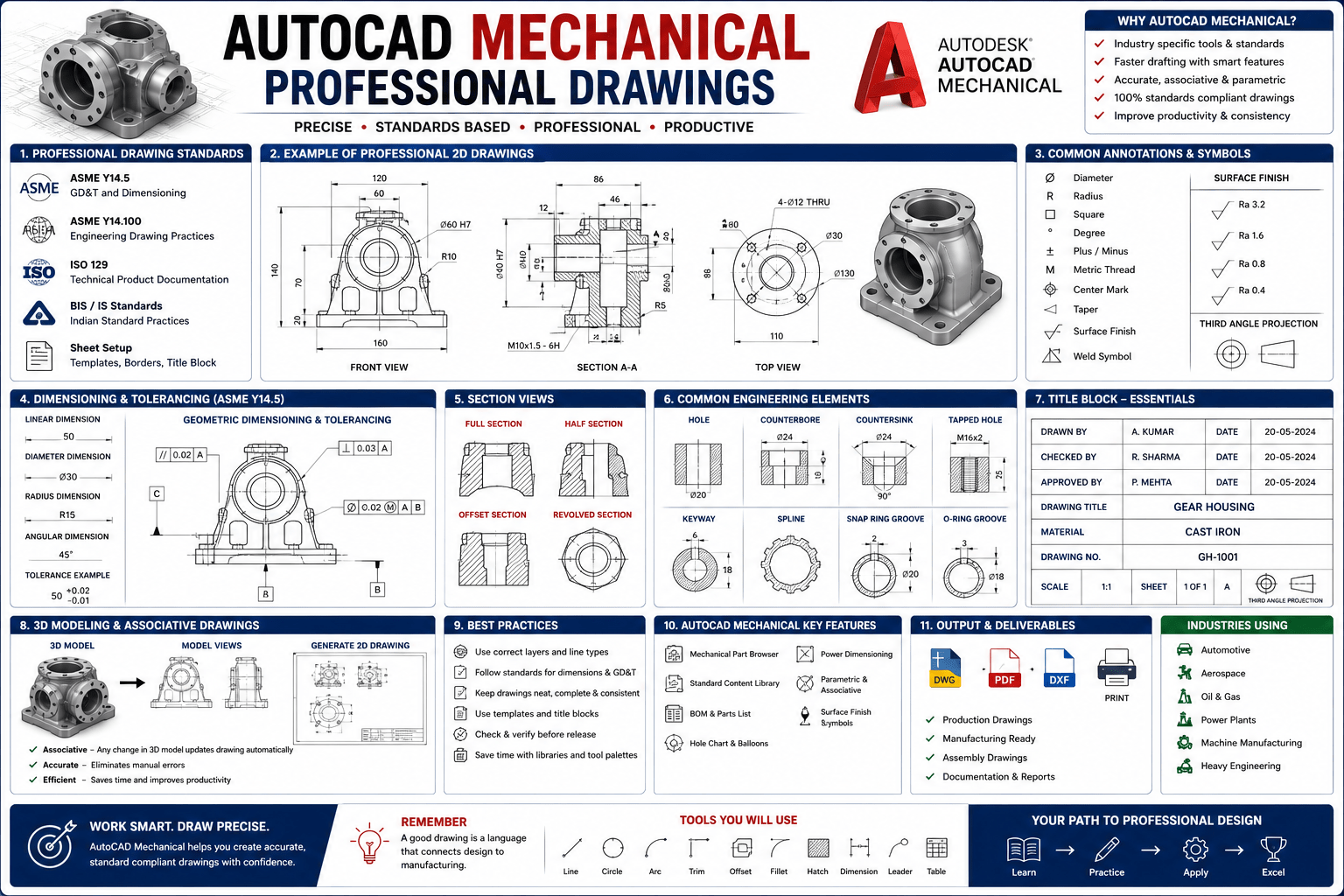
Introduction
Every great machine starts with a drawing. Before any component is manufactured, before any assembly is built, there is a technical drawing that communicates the design intent with precision and clarity. These drawings are the language of mechanical engineering—the medium through which ideas become reality.
AutoCAD Mechanical professional drawings is the tool that professional mechanical engineers and drafters use to create these essential documents. It is the software that turns conceptual designs into detailed, manufacturable drawings that can be understood by machinists, fabricators, and quality inspectors. For decades, AutoCAD has been the industry standard for computer-aided design, and AutoCAD Mechanical brings specialised tools that make mechanical drafting faster, more accurate, and more professional.
Yet for many aspiring mechanical engineers and drafters, the journey to AutoCAD proficiency can seem daunting. The interface appears complex. The commands seem endless. The gap between drawing a simple line and creating a professional mechanical drawing seems impossibly wide.
The truth is that AutoCAD Mechanical is remarkably accessible when taught correctly. The key is a structured, step-by-step approach that builds skills progressively—from navigating the interface to creating complex assembly drawings complete with bills of materials and professional documentation.
The AutoCAD Mechanical: From Basics to Professional Drawings course provides exactly this structured approach. Designed by a certified Autodesk expert with over 12 years of experience, this job-oriented training takes you from absolute beginner to confident professional equipped with the skills to produce manufacturing-ready drawings.
This guide provides a comprehensive overview of what AutoCAD Mechanical is, why these skills matter for your career, what the course covers, and how you can begin your journey to becoming a professional mechanical drafter.
What Is AutoCAD Mechanical?
AutoCAD Mechanical is specialised software developed by Autodesk, designed specifically for mechanical engineering design and drafting. It builds upon the foundation of standard AutoCAD while adding industry-specific features that make mechanical drafting faster, more accurate, and more efficient.
Key Features of AutoCAD Mechanical
Mechanical Parts Libraries
AutoCAD Mechanical includes extensive libraries of standard mechanical components such as bolts, screws, nuts, washers, and other fasteners. Instead of drawing these components from scratch, you can insert them directly from the library, saving significant time and ensuring accuracy.
Automated Bill of Materials (BOM)
Creating a bill of materials is an essential part of mechanical documentation. AutoCAD Mechanical automates this process, generating accurate BOMs directly from your drawing. When you add or remove components, the BOM updates automatically.
Power Dimensioning
Dimensioning mechanical drawings can be tedious and error-prone. AutoCAD Mechanical includes power dimensioning tools that make the process faster and more consistent, ensuring your drawings meet professional standards.
Layer Management
Proper layer management is essential for organised, professional drawings. AutoCAD Mechanical includes automated layer management that follows mechanical drafting standards.
Mechanical Symbol Libraries
Standard mechanical symbols for welding, surface texture, geometric tolerancing, and other annotations are built into the software. This ensures consistency and compliance with industry standards.
Hidden Line Removal
When creating assembly drawings, hidden lines must be represented correctly. AutoCAD Mechanical includes tools for automatic hidden line removal, saving hours of manual editing.
AutoCAD Mechanical vs. Standard AutoCAD
For mechanical engineers and drafters, AutoCAD Mechanical is the superior choice. While standard AutoCAD is a general-purpose drafting tool, AutoCAD Mechanical is purpose-built for mechanical design. The specialised tools and libraries can reduce drafting time by hours or even days on complex projects.
Why AutoCAD Mechanical Skills Matter for Your Career
Industry Standard Tool
AutoCAD is one of the most widely used CAD software packages in the mechanical engineering industry. Proficiency in AutoCAD Mechanical is a skill that employers actively seek and value. It is the tool that mechanical engineers, drafters, and designers use daily to create the drawings that become real products.
Career Opportunities
AutoCAD Mechanical skills open doors to a wide range of roles across multiple industries:
- Mechanical Drafter: Creating detailed technical drawings for manufacturing
- CAD Technician: Supporting engineering teams with CAD documentation
- Design Engineer: Using CAD as part of the product development process
- Mechanical Designer: Developing mechanical designs and creating production documentation
- Freelance Drafter: Offering drafting services to engineering firms and manufacturers
- Manufacturing Engineer: Creating and interpreting drawings for production
As the course description notes, this training is designed for “mechanical engineering students, diploma holders, and professionals who want to master the tools and techniques used in mechanical drafting”.
Foundation for Professional Practice
In the modern engineering workplace, CAD proficiency is not optional—it is essential. Mechanical drawings are the primary means of communicating design intent. Without the ability to create and interpret these drawings, you cannot effectively contribute to the design and manufacturing process.
Practical, Tangible Skill
Unlike some engineering skills that remain theoretical, AutoCAD proficiency produces tangible results. The drawings you create become real products that people use every day. There is a unique satisfaction in seeing your designs come to life in the workshop or factory.
Freelance and Consulting Opportunities
Proficiency in AutoCAD Mechanical enables freelance and consulting opportunities. Many engineering firms and manufacturers need drafting support but do not have the capacity to employ full-time drafters. Skilled freelancers are in demand.
What You Will Learn in This Course
The AutoCAD Mechanical: From Basics to Professional Drawings course is a structured, job-oriented training program designed specifically for mechanical engineering students, diploma holders, and professionals.
Course Overview
| Feature | Detail |
|---|---|
| Total Duration | 7 hours 36 minutes |
| Number of Lectures | 34 lectures |
| Number of Chapters | 21 chapters |
| Language | Hindi |
| Instructor | Hardik Acharya – Certified Autodesk Expert |
| Instructor Experience | 12+ years in CAD training and mechanical design education |
| Last Updated | August 2025 |
| Software Version | AutoCAD Mechanical 2018 or later |
What You Will Master
Master 2D Drafting Techniques
You will learn to create precise technical drawings using industry-standard drafting tools. This is the foundation of all mechanical drafting work.
Understand and Apply Mechanical Design Standards
You will work with standard parts, symbols, and annotations used in professional mechanical drawings. This ensures your drawings meet industry expectations.
Develop and Interpret Engineering Drawings
You will gain confidence in creating and reading complex mechanical blueprints and assembly drawings. This ability is essential for any role in mechanical design or manufacturing.
Create and Manage Layers, Blocks, and Templates
You will learn to organise your drawings for efficiency, clarity, and reuse in future projects. Professional drafters work efficiently, and this module teaches you how.
Complete Understanding of the AutoCAD Mechanical Interface and Toolset
You will gain complete familiarity with the software environment.
Intelligent Drafting Using Standard Parts and Content Libraries
You will learn to use mechanical content libraries to speed up your drafting work.
Creation of Bill of Materials (BOM) and Title Blocks
You will learn to create professional documentation for manufacturing.
Techniques for Editing, Optimising, and Exporting Drawings
You will learn to prepare drawings for production use.
Hands-On Experience with Live Industrial Project Drawings
You will practice with real-world project drawings for portfolio building.
Course Highlights
- Real-Time Drafting Workflows: Reflect current industry demands
- Practice Exercises: After key sections to reinforce concepts
- Mini-Projects and Challenges: To apply your learning
- Quizzes and Downloadable Resources: For revision and reference
- Active Q&A Support: To resolve your doubts quickly
Enrol in AutoCAD Mechanical: From Basics to Professional Drawings Now
Who Should Take This Course
Mechanical Engineering Students
Students who want to build strong CAD skills and gain a competitive edge in academics or job placements will find this course invaluable. It bridges the gap between academic theory and practical industry requirements.
Diploma and ITI Students
Students in mechanical or design-related fields looking to enter the design and manufacturing sector will benefit from the practical, industry-focused training.
Complete Beginners
As the course description states, “No prior AutoCAD or CAD experience is required. This course is designed for complete beginners”.
Working Professionals Seeking Upskilling
Professionals who want to refresh their AutoCAD Mechanical skills or add new capabilities will find the structured, practical approach effective.
Freelance Drafters
Those seeking to offer drafting services to engineering firms and manufacturers will gain the professional skills needed to compete in the marketplace.
Requirements
The course has modest and accessible requirements:
- No prior AutoCAD or CAD experience required – The course is designed for complete beginners
- Basic understanding of mechanical concepts (views, dimensions, machine parts) is helpful but not mandatory
- AutoCAD Mechanical software (2018 or later) should be installed on your computer to follow along with practical exercises
- PC or laptop with moderate system configuration (recommended: 8 GB RAM, i3/i5 processor or better)
- Willingness to learn and practice regularly – Consistency is key to mastering any design software
Frequently Asked Questions
What is the difference between AutoCAD and AutoCAD Mechanical?
AutoCAD is a general-purpose CAD software used across multiple disciplines. AutoCAD Mechanical is a specialised version that includes mechanical-specific tools, parts libraries, and drafting features designed specifically for mechanical engineering and manufacturing applications.
Do I need prior AutoCAD experience to take this course?
No. The course is designed for complete beginners. No prior AutoCAD or CAD experience is required.
What version of AutoCAD Mechanical do I need?
AutoCAD Mechanical 2018 or later is recommended.
How long is the course?
The course includes 7 hours 36 minutes of video content across 34 lectures and 21 chapters.
What language is the course taught in?
The course is taught in Hindi.
Who is the instructor?
The course is taught by Hardik Acharya, a certified Autodesk expert with over 12 years of experience in CAD training and mechanical design education.
Will I receive a certificate upon completion?
Yes. Udemy provides a certificate of completion for this course.
What will I be able to do after completing this course?
By the end of this course, you will have the confidence and skill to create professional-grade mechanical drawings, prepare manufacturing-ready documentation, and take on freelance or industrial drafting projects using AutoCAD Mechanical.
Mastering AutoCAD Mechanical: Your Next Step
Learning AutoCAD Mechanical presents a choice. You can struggle through fragmented online tutorials and incomplete resources. Or you can take a structured, comprehensive course designed by a certified Autodesk expert with over 12 years of experience.
The AutoCAD Mechanical: From Basics to Professional Drawings course provides exactly this structured approach. With 7.5 hours of comprehensive instruction across 34 lectures and 21 chapters, you will develop the skills to:
- Create precise 2D mechanical drawings using industry standards
- Understand and apply mechanical design standards and symbols
- Create and manage layers, blocks, and templates effectively
- Generate professional Bills of Materials and title blocks
- Produce manufacturing-ready documentation
- Build a portfolio of industrial project drawings
The course starts from the very basics. No prior AutoCAD experience is required.
Enrol in AutoCAD Mechanical: From Basics to Professional Drawings Now
Recommended Related Courses
To build a comprehensive AutoCAD and mechanical design skillset, consider these additional courses:
AutoCAD for Mechanical Design – Quick and Practical Projects – Build practical skills through 20 quick, hands-on projects.
AutoCAD Mechanical 2D and 3D for Beginners to Advanced – Comprehensive training covering both 2D and 3D capabilities.
Complete AutoCAD 2021 Course: Both 2D and 3D – Mechanical – Complete AutoCAD training specifically for mechanical engineers.
Learn AutoCAD 2023 – 21 Mechanical 2D and 3D Complete Course – Updated course covering the latest AutoCAD features.
Mastering AutoCAD Mechanical 2026 with Real Examples – Advanced training with practical, real-world examples.
AutoCAD Mechanical with 100+ Drawings Practice – Extensive practice with over 100 drawing exercises.
Mechanical Engineering-Machine Designing-1 – Build foundational machine design knowledge to complement your CAD skills.
Basics of Mechanical Design Engineering (2022) – Understand the fundamentals of mechanical design engineering.
Final Thoughts
AutoCAD Mechanical is an essential tool for mechanical engineers, drafters, and designers. It is the software that turns concepts into detailed, manufacturable drawings. It is the language through which design intent is communicated to the workshop floor. It is a skill that employers value and that opens doors to rewarding careers.
The journey to becoming a confident AutoCAD Mechanical user starts with a single step: learning the fundamentals from a structured, expert-led course. The AutoCAD Mechanical: From Basics to Professional Drawings course provides that foundation. With 7.5 hours of expert instruction, practical exercises, and real-world projects, it is the ideal starting point for anyone serious about a career in mechanical drafting and design.
Start your AutoCAD Mechanical journey today.
Enrol in AutoCAD Mechanical: From Basics to Professional Drawings
About the Author